Thank you for choosing to become an affiliate partner with The Money Factory. We’re thrilled to have you join our team and look forward to working together to achieve great results. This document is designed to provide you with all the essential information you need to get started. Whether you’re new to affiliate marketing or an experienced partner, you’ll find helpful tips, key resources, and answers to common questions to ensure a smooth and successful collaboration. Let’s embark on this exciting journey together!
The Money Factory offers an advanced affiliate platform with a variety of customizable features to meet
the specific needs of each affiliate. Follow these simple steps to get started:
Once registered, send the email address used during registration to your affiliate manager. This step is necessary for account activation and offer setup.
3.
After activation, you will receive a confirmation email notifying you that your account is ready to use.
We aim to make the onboarding process seamless so you can focus on driving results. If you encounte
any issues, your affiliate manager is here to assist you!
Getting Started with the Affiliate Platform
Our affiliate platform is designed to provide you with powerful tools and insights to maximize your performance. Here’s an overview of its key features:
Flexible
Reporting
Track your performance by days, traffic channels, and individual links. You can analyze the effectiveness of each link with detailed SUB ID tracking
Invoice
Generation
The platform allows you to generate invoices directly, streamlining the payment process.
Commission
Payments
All affiliate commissions are processed and paid through the platform for your convenience.
In the following sections, we will dive deeper into each feature to help you get the most out of the platform.
Dashboard
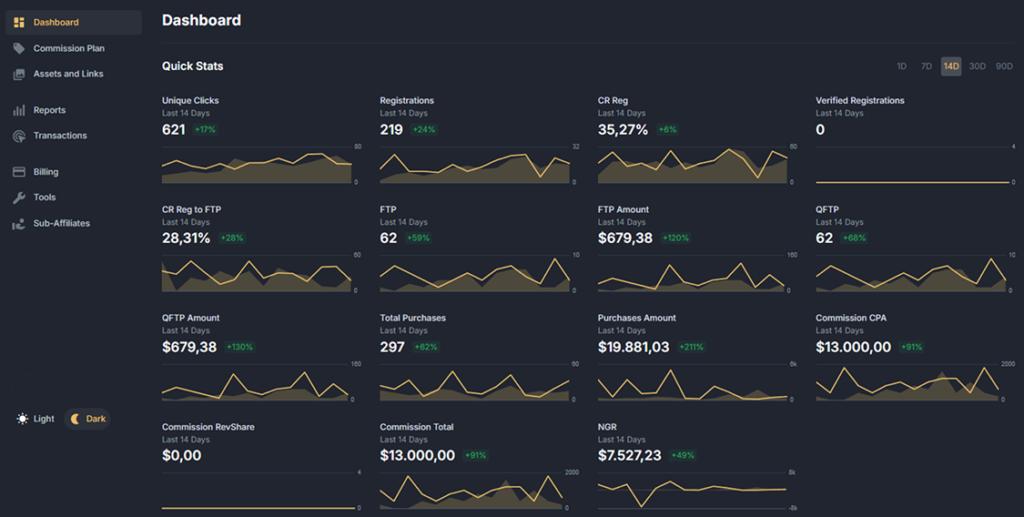
The Dashboard is your central hub for tracking performance at a glance. Here’s what you can do on this tab:
Quick Performance Overview
Instantly view key metrics that reflect your campaign’s effectiveness.
Customizable
Timeframes
Access statistics for the last 1, 7, 14, 30, or 90 days to analyze trends and results.
Earnings
Summary
See the total amount you’ve earned in a clear, user-friendly format.
The Dashboard is designed for quick and easy access to the data that matters most, so you can make informed decisions in real-time.
Commission Plan
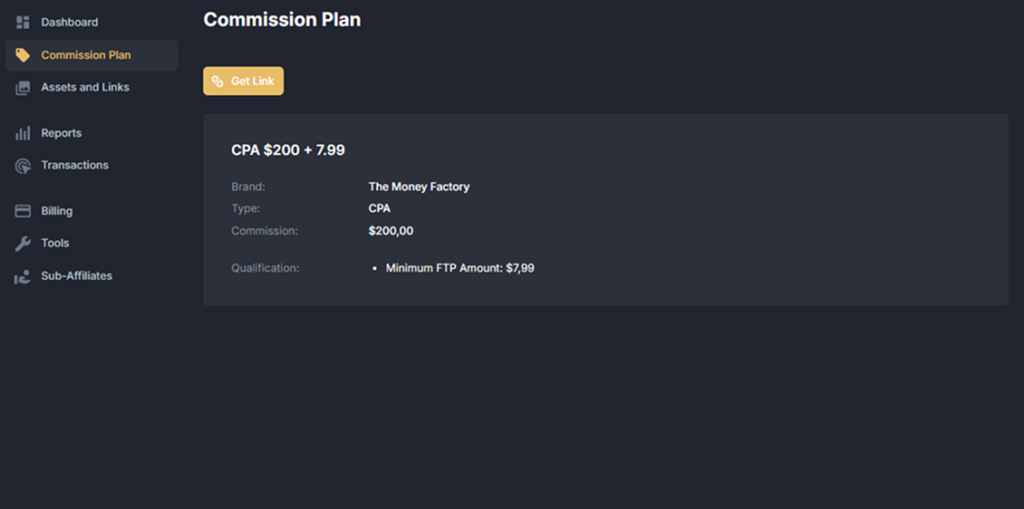
The Commission Plan tab provides a detailed overview of your current commission structure and its terms. Here’s what you can find:
Current
Rates
View the exact commission rates.
Terms and
Conditions
Understand the requirements and conditions tied to your commission plan.
Performance-Based
Adjustments
If applicable, track any changes to your plan based on your results.
This section ensures transparency and helps you stay informed about your earnings potential.
For questions or adjustments, feel free to reach out to your affiliate manager.
Assets and Links
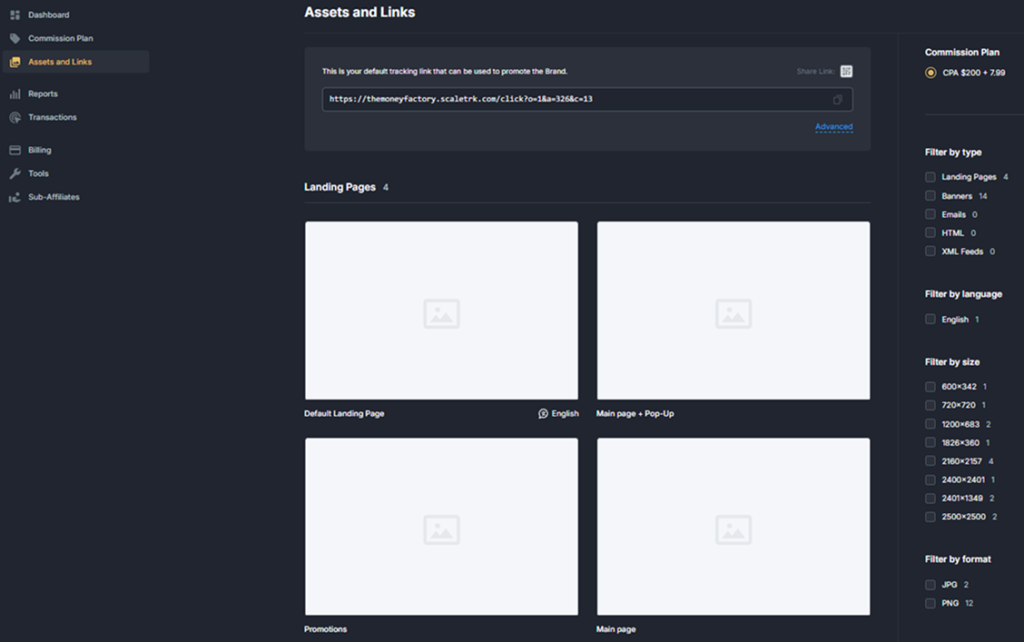
The Assets and Links tab is your go-to resource for managing promotional materials and tracking traffic effectively. Here’s what you can do:
Approved Marketing
Materials
Access a library of preapproved banners, creatives, and other advertising assets.
Affiliate Link
Management
Retrieve your unique affiliate link. By default, this link directs traffic to the homepage, which we highly recommend using for best results.
Link Customization
Change the destination page to redirect traffic to specific sections of the website, such as a particular category or promotion. Add SUB IDs to your links for granular tracking. This allows you to identify which specific link or traffic source is driving results when you use multiple channels.
This section ensures transparency and helps you stay informed about your earnings potential. For questions or adjustments,
feel free to reach out to your affiliate manager.
Reports
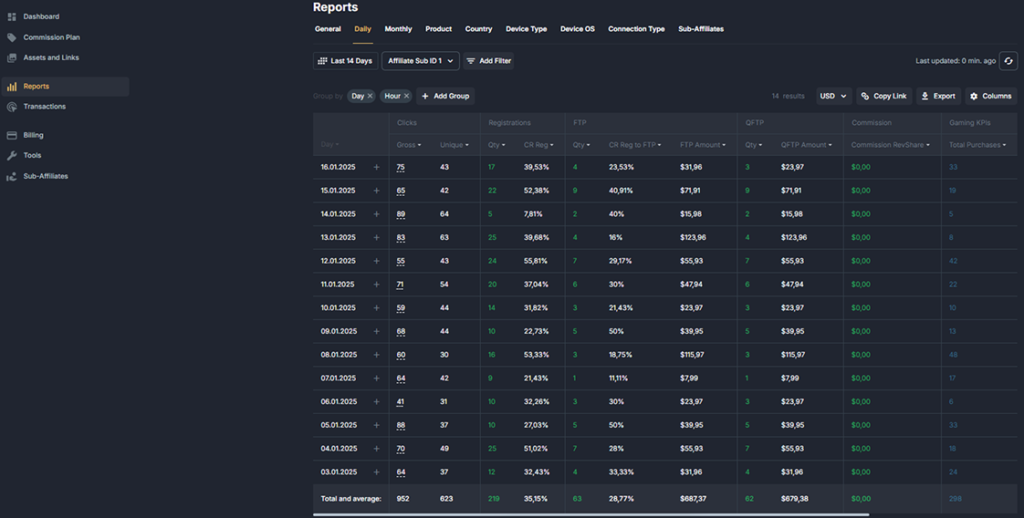
The Reports tab provides detailed insights into your performance across various parameters. Here’s what you can do:
Customizable Statistics
Download performance reports filtered by specific criteria such as daily, weekly, or monthly results.
Traffic
Breakdown
Analyze traffic by device type, operating system, and other key metrics to optimize your campaigns.
SUB Affiliate
Performance
Track the results generated by sub-affiliates you refer to our platform. As a bonus, you’ll earn 5% of the revenue they generate as part of our referral program.
This section ensures transparency and helps you stay informed about your earnings potential. For questions or adjustments,
feel free to reach out to your affiliate manager.
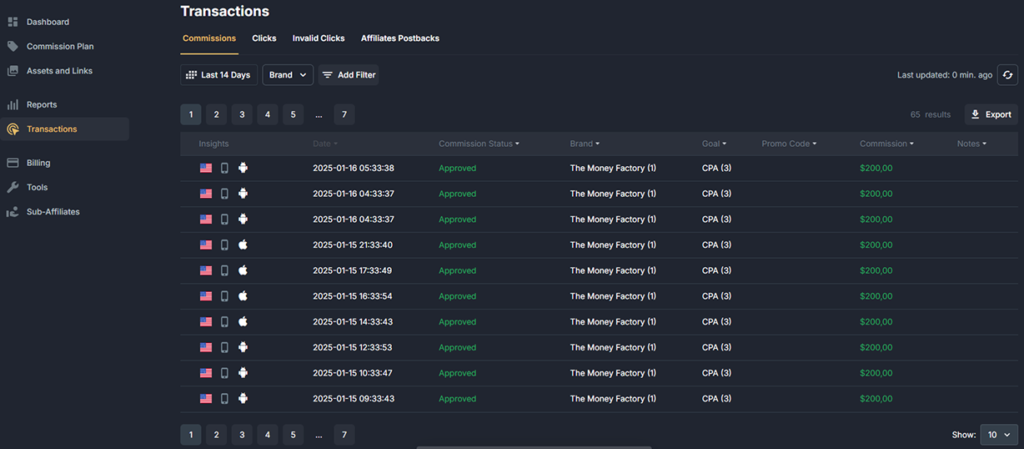
Transactions
The Transactions tab is designed for advanced performance tracking and detailed analytics. Here’s what you can do:
Player
Transactions
View the individual transactions made by the players you’ve referred. This allows you to monitor player activity and assess the quality of your traffic.
Postback
Settings
Review and manage your configured postbacks for seamless data tracking and reporting.
This tab is ideal for affiliates who want in-depth insights into player behavior and customized tracking solutions.
If you need help setting up or optimizing postbacks, your affiliate manager is ready to assist.
Billing
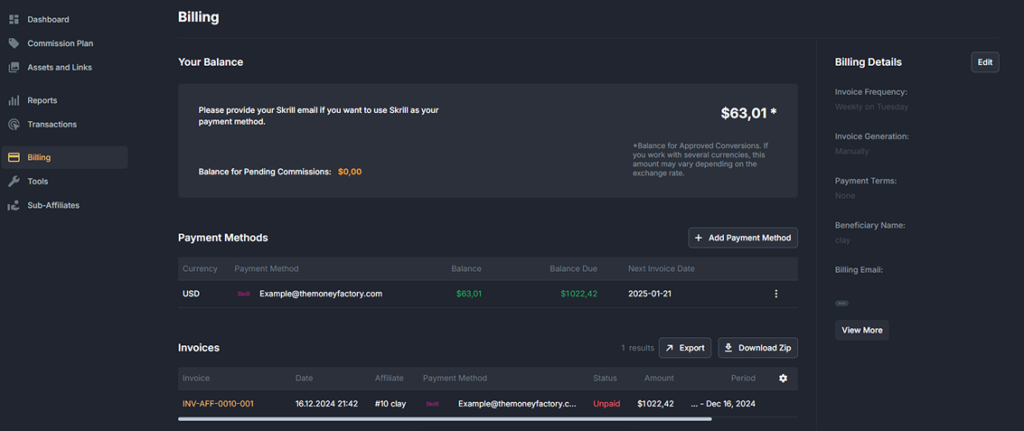
The Billing tab is your central place to manage commission payouts, configure payment methods, and track invoice statuses. Here’s how it works:
Payment Tracking and Setup
Payment Status:
Monitor the status of your commission payouts and ensure all necessary details are correctly provided.
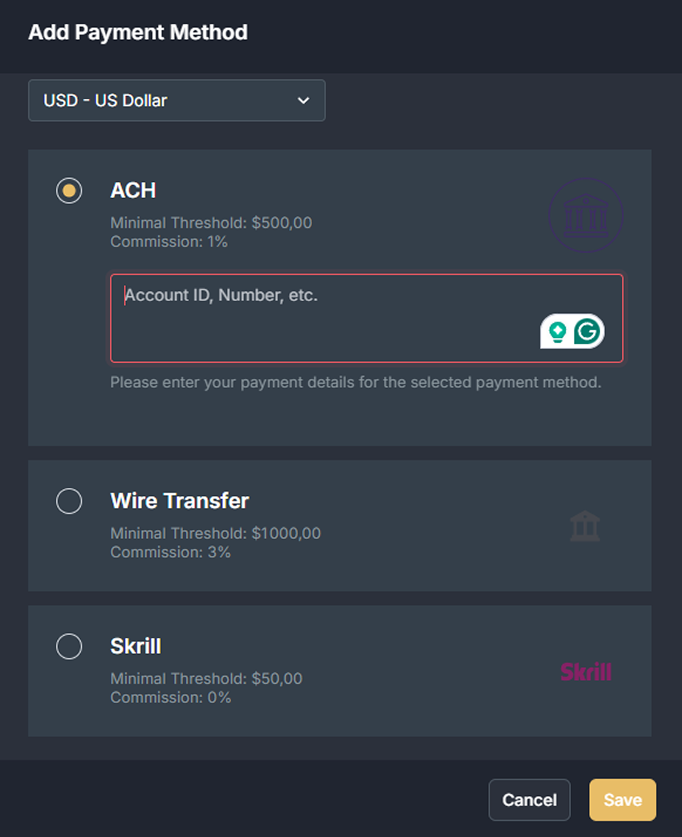
Add Payment Method:
Configure your preferred payment method by clicking the Add Payment Method button, selecting USD as the currency, and choosing from three options:
1. ACH (Automated Clearing House):
Minimum Threshold: $500
Commission Fee: 1%
2. Wire Transfer:
Minimum Threshold: $1,000
Commission Fee: 3%
3. Skrill:
Minimum Threshold: $50
Commission Fee: 0%
Once you’ve selected a payment method, provide the required details:
For ACH and Wire Transfer: Submit your full account details, legal company name, and legal company address.
For Skrill: Simply provide the email address associated with your Skrill account. Please note that we require the exact email address
used for your Skrill registration.
Payment Schedule
Payouts are made on the specified payment dates, provided the following conditions are met:
You have reached the minimum threshold for your selected payment method ($500 for ACH, $1,000 for Wire Transfer, $50 for Skrill).
Your payment details are accurate and complete.
If you encounter any issues or need assistance setting up your payment method, your affiliate manager is here to help.
Invoice Management
In the Invoices section, you can:
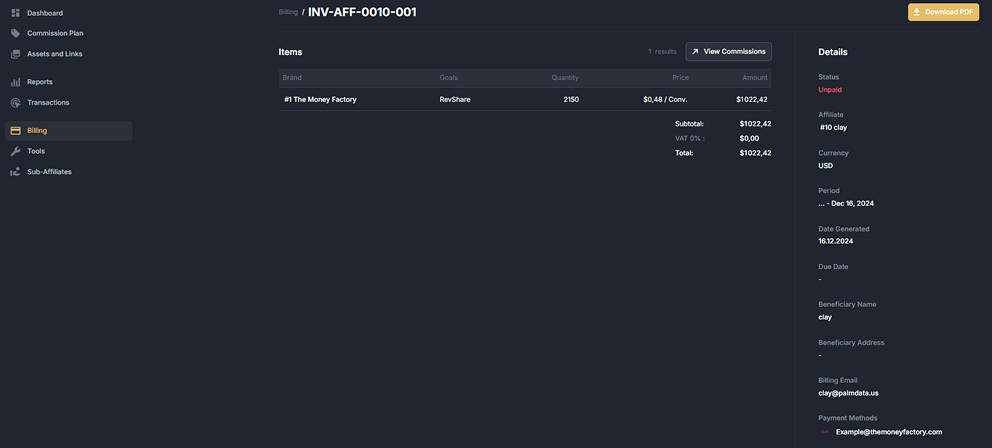
Track the status of your submitted invoices.
Download your invoice in PDF format for your records by clicking on the invoice name and selecting Download PDF.
This tab ensures that managing your payments is easy and transparent, so you can focus on growing your earnings.
Tools
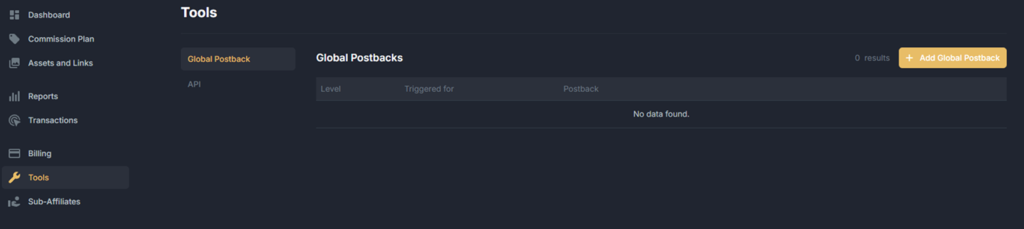
The Tools tab is designed for advanced affiliates who require enhanced data tracking and integration. Here’s what you can do:
Postback
Configuration
Set up postbacks to automatically receive real-time conversion data in your system. This is particularly useful for integrating with CRM systems or custom reporting tools.
API
Integration
Configure API access for seamless data transfer and deeper analytics.
Important Note: After setting up postbacks or API integration, contact your affiliate manager. They will activate data transmission
and provide you with an API key to enable secure access.
This tab empowers you to take your performance monitoring to the next level, offering greater flexibility and control over your data.
If you need assistance with setup, your affiliate manager is ready to guide you through the process.
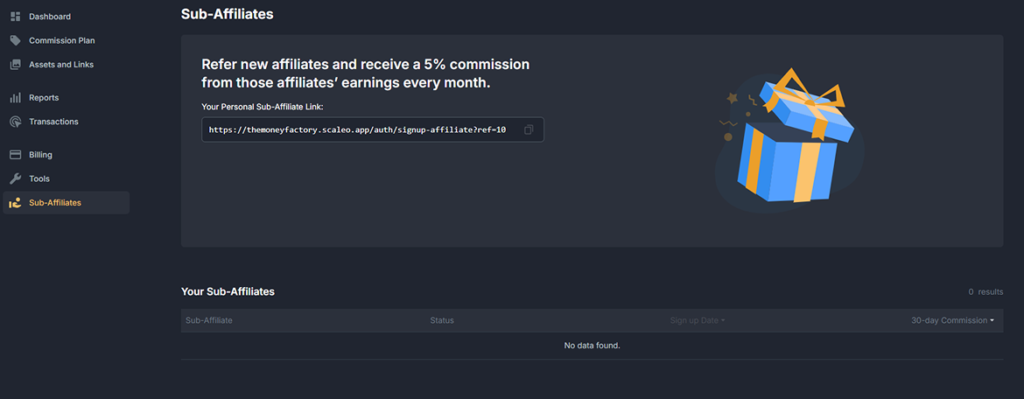
Sub-Affiliates
The Sub-Affiliates tab allows you to expand your earning potential by inviting other affiliates to join our system. Here’s how it works:
Invitation Link: Access your unique referral link to invite new affiliates to the The Money Factory affiliate program. Earnings Opportunity: You will earn 5% of the revenue generated by the affiliates you refer.
If you have any questions about the sub-affiliate program or need assistance with your referral link, don’t hesitate to reach
out to your affiliate manager
FAQs
Affiliate Platform
1. What does RS% stand for?
RS% stands for Revenue Share Percentage, which is the percentage of the NGR (Net Gaming Revenue) that affiliates earn as their commission.
2. Does The Money Factory affiliate platform use last-click attribution?
Yes, The Money Factory utilizes last-click attribution to track conversions and attribute them to the last affiliate link clicked by the player.
3. How does The Money Factory handle cookies for tracking?
The Money Factory stores cookies for 30 days. If a user clicks your affiliate link but doesn’t register right away, they will still be attributed to you if they complete their registration within this timeframe.
4. Can I integrate postbacks for tracking?
Yes, The Money Factory allows you to set up postbacks through the Tools tab. Once configured, you’ll need to contact your affiliate manager to activate the API and provide your API key to ensure proper data tracking.
5. Is there an admin fee?
Yes, we charge a 20% admin fee, which is deducted from the GGR (Gross Gaming Revenue). Your RS commission is then calculated based on the NGR (Net Gaming Revenue) after the admin fee is applied.
Links & tracking
1. Can I create links to specific sections of the website?
Yes, while we recommend using the default link to the homepage, you can request your affiliate manager to enable specific sections. Once enabled, you can generate custom links to those sections within the platform.
2. Can I track performance across different traffic sources?
Yes, you can use SUB ID 1 and SUB ID 2 when generating your affiliate links. These parameters help you monitor results for specific traffic sources or individual creatives, providing detailed performance insights.
Statistics and Terminology
1. What does FTP represent?
FTP refers to the number of players who have made their first purchase of a promotional game package.
2. What are Qualified FTPs?
Qualified FTPs represent the number of players who have met or exceeded the requirements outlined in the commission plan. Note that this metric is not applicable to all commission structures.
3. What does GGR stand for?
GGR stands for Gross Gaming Revenue, which represents the total amount of Sweeps Coins wagered by players minus the total Sweeps Coins redeemed by them.
4. What does NGR stand for?
NGR stands for Net Gaming Revenue, which is calculated as the GGR (Gross Gaming Revenue) minus the 20% admin fee.
Payments
1. Do I need to generate invoices manually?
No, our finance department generates and processes invoices for you. Once completed, the invoice will appear in your account.
2. Can I issue my own invoices for payment?
No, we only process payments based on invoices generated by our system. This ensures accuracy and timely payments. We kindly ask you to rely on our system-generated invoices, which you can find in your account.
3. How often are payments processed?
Payments are processed every Tuesday, as long as it is a business day and the minimum payout threshold is met. If preferred, we can arrange a custom payment schedule, such as monthly payments.
4. What should I do if my invoice is marked as paid but the funds haven’t
arrived?
No action is required initially. Depending on the selected payment method, it can take up to 7 business days for the funds to reach your account. To receive payments faster, we recommend using a Skrill wallet. If the funds have not arrived after 7 business days, please contact your affiliate manager for assistance.